Sep. 30, 2026
USB cables are wired connectivity products that transfer digital data, electrical power, or both between devices. Selecting the correct USB cable type helps a business prevent communication failures, reduce equipment downtime, support the required charging power, and maintain reliable field performance. For consumer electronics, this may mean choosing a USB-C charging cable. For industrial equipment, it may require a shielded, high-flex, locking cable with controlled impedance and documented quality inspection.
This guide explains USB Cable Types Explained for Industrial and Consumer Applications, including connector formats, USB generations, power delivery, mechanical construction, compliance requirements, and selection methods. It also shows how an experienced usb cable manufacturer such as LENSHUO can support application-specific USB connectivity solutions.
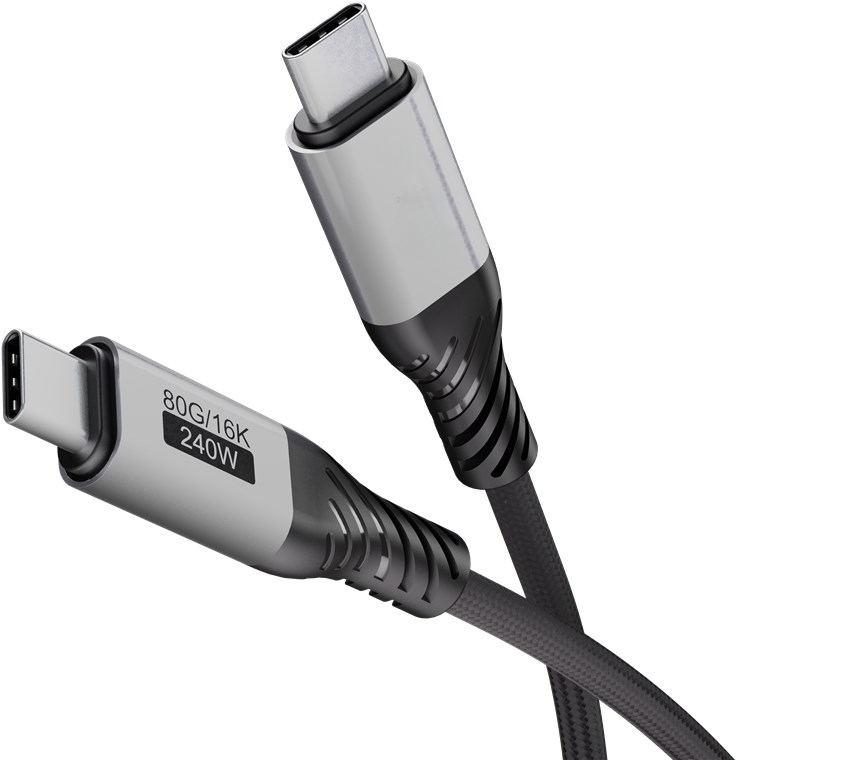
USB is often treated as a simple plug-and-play interface, but the cable is part of the complete transmission channel. Conductor size, shielding, connector plating, insulation material, strain relief, and manufacturing tolerances all influence performance.
A properly specified cable can deliver measurable business value:
The Universal Serial Bus was introduced in the 1990s to replace a wide range of computer interfaces with a simpler standardized connection. USB 1.x supported basic peripheral communication, while USB 2.0 expanded capability to a theoretical 480 Mbps. USB 3.x later introduced higher-speed SuperSpeed signaling, including 5 Gbps, 10 Gbps, and 20 Gbps modes depending on the specification and implementation.
USB Type-C was developed as a reversible connector format that supports data, charging, alternate modes, and USB Power Delivery when the host, device, and cable are designed for those functions. USB4 further integrates high-speed data and display-oriented protocols over Type-C, but the connector alone does not guarantee a specific speed.
As electronics moved into factories, vehicles, laboratories, and outdoor systems, standard consumer cables were no longer sufficient for every application. Industrial USB connectivity solutions now commonly require enhanced EMI shielding, vibration resistance, repeated-flex capability, secure retention, and traceable inspection records.
USB Type-A is the familiar rectangular connector found on computers, chargers, hubs, monitors, and legacy equipment. It is widely used for USB 2.0 and USB 3.x connections, but the connector shape alone does not identify the data rate or charging capability.
Type-A remains useful when a machine, industrial PC, barcode reader, or test fixture has a fixed legacy port. However, it is not reversible and is less suitable for compact products that require a modern connector interface.
USB Type-B has a squarish connector commonly used in printers, instrumentation, development equipment, and some industrial devices. Variations include standard Type-B, Mini-B, and Micro-B designs.
Its larger housing can provide mechanical stability, but users must verify the exact connector version before ordering. A USB 2.0 Type-B cable cannot automatically provide USB 3.x performance simply because the device has a USB-related label.
Micro-B connectors are compact and remain present in cameras, portable instruments, hard drives, and embedded equipment. USB 3.0 Micro-B connectors are wider and use additional contacts for SuperSpeed transmission.
These cables require careful mating because the connector is smaller and can experience mechanical wear under repeated insertion. For high-cycle applications, connector retention and strain-relief design should be reviewed during qualification.
USB Type-C is reversible and supports a broad range of applications. Depending on the product design, a Type-C cable may support USB 2.0, USB 3.2, USB4, DisplayPort Alt Mode, or USB Power Delivery.
Important Type-C specifications may include:
| USB category | Typical theoretical data rate | Common application | Key specification concern |
|---|---|---|---|
| USB 2.0 | 480 Mbps | Keyboards, printers, control panels, basic sensors | Conductor quality, shielding, voltage drop |
| USB 3.2 Gen 1 | 5 Gbps | Storage, cameras, industrial data collection | Differential-pair impedance and crosstalk |
| USB 3.2 Gen 2 | 10 Gbps | High-speed storage and machine vision | Insertion loss, return loss, EMI control |
| USB 3.2 Gen 2x2 | 20 Gbps | High-performance portable storage | Host and device compatibility |
| USB4 | Up to 40 Gbps or higher in supported versions | Docking stations, displays, professional workstations | Certified cable capability and protocol support |
These are maximum signaling rates, not guaranteed file-transfer speeds. Operating systems, controllers, storage media, cable length, thermal conditions, and protocol overhead can reduce actual throughput. A responsible USB cable manufacturer should identify the tested performance level rather than relying only on connector appearance.
Consumer cables are commonly used for smartphones, tablets, laptops, power banks, cameras, gaming accessories, and home-office equipment. Priorities usually include convenience, compact design, charging performance, flexibility, and price.
For a consumer purchase, confirm:
Industrial equipment places greater demands on cable assemblies. A cable may be routed through a cable carrier, exposed to oil mist, installed near variable-frequency drives, or subjected to vibration and repeated mating.
Industrial USB connectivity solutions may include:
In these environments, cable selection should be treated as an engineering decision rather than a commodity purchase. A cable that works on a desk may fail after repeated flexing or in a high-noise production cell.
USB-C describes the connector interface, not the complete electrical capability. Some Type-C cables support only USB 2.0 data, while others support high-speed USB4 signaling, video functions, or higher-power USB PD operation.
Longer assemblies introduce greater attenuation, resistance, propagation delay, and susceptibility to electromagnetic interference. High-speed applications may require an active cable, retimer, hub, or a shorter passive construction.
A cable can carry substantial charging current while supporting only USB 2.0 data. Charging performance and data performance must be specified separately.
Shield effectiveness depends on coverage, termination, connector design, grounding strategy, braid coverage, foil construction, and installation. An unbroken shield termination is especially important in industrial systems.
Compliance with a standard improves interoperability, but it does not automatically prove resistance to vibration, oil, flexing, salt spray, or a specific factory environment. Application-level validation remains necessary.
Reliable USB connectivity solutions require more than a visual inspection. A documented quality plan should connect material control, process control, electrical testing, mechanical testing, and final inspection.
Depending on the product and market, buyers may request:
Typical production controls can include 100% continuity and short-circuit inspection, hipot testing where applicable, contact-resistance checks, conductor resistance measurement, pull-force testing, bending tests, and visual inspection. For precision assemblies, connector placement or overmold dimensions may be controlled to 0.01 mm according to the approved drawing and measurement method.
When evaluating LENSHUO as a usb cable manufacturer, buyers should request the actual control plan, test report scope, material specification, sample approval record, and change-control process. A defined 24-hour response target for engineering or quality inquiries can also help reduce production delays, but the target should be confirmed in the supplier agreement.
Consider a machine-vision station that connects a high-resolution camera to an industrial computer. The system requires high-speed data transmission, continuous operation, and resistance to electrical noise from nearby motors.
A basic consumer USB cable may initially connect the camera, but intermittent frame loss can occur because of inadequate shielding, excessive length, poor impedance control, or weak strain relief. The engineering team can improve reliability by following this process:
This approach illustrates why industrial USB connectivity solutions should be qualified in the final installation, not only tested on a laboratory bench.
Use the following specification sequence before requesting a quotation from LENSHUO or another qualified supplier:
LENSHUO can be evaluated as a custom cable partner when a project requires more than an off-the-shelf assembly. The appropriate supplier should be able to translate a device interface and operating environment into a controlled cable design, including conductor selection, shielding architecture, connector sourcing, overmold geometry, and test requirements.
For procurement and engineering teams, the strongest USB connectivity solutions are supported by clear drawings, approved samples, repeatable production processes, and objective inspection data. Ask for evidence such as 100% electrical testing, dimensional inspection records with 0.01 mm precision where relevant, and a defined 24-hour response procedure for urgent technical questions.
USB cable selection depends on more than connector shape. Data rate, power delivery, signal integrity, shielding, mechanical durability, environmental exposure, and compliance requirements must be considered together.
Whether the need is a consumer charging lead, a high-speed data assembly, or a rugged machine cable, the next step is to document the interface, performance, environment, and inspection requirements. With those details defined, LENSHUO can help businesses develop USB connectivity solutions and application-specific USB cable assemblies with a clearer path to reliable production.
Give Us A Call
+86 136 6270 0743
Send Us A Message
Official Location
Shipai Town, Dongguan City, Guangdong, China

As source factory, we have the most strict requirements on quality and service. We can video the production process for clients and provide free samples for quality testing.
Navigation
Products
Media Center