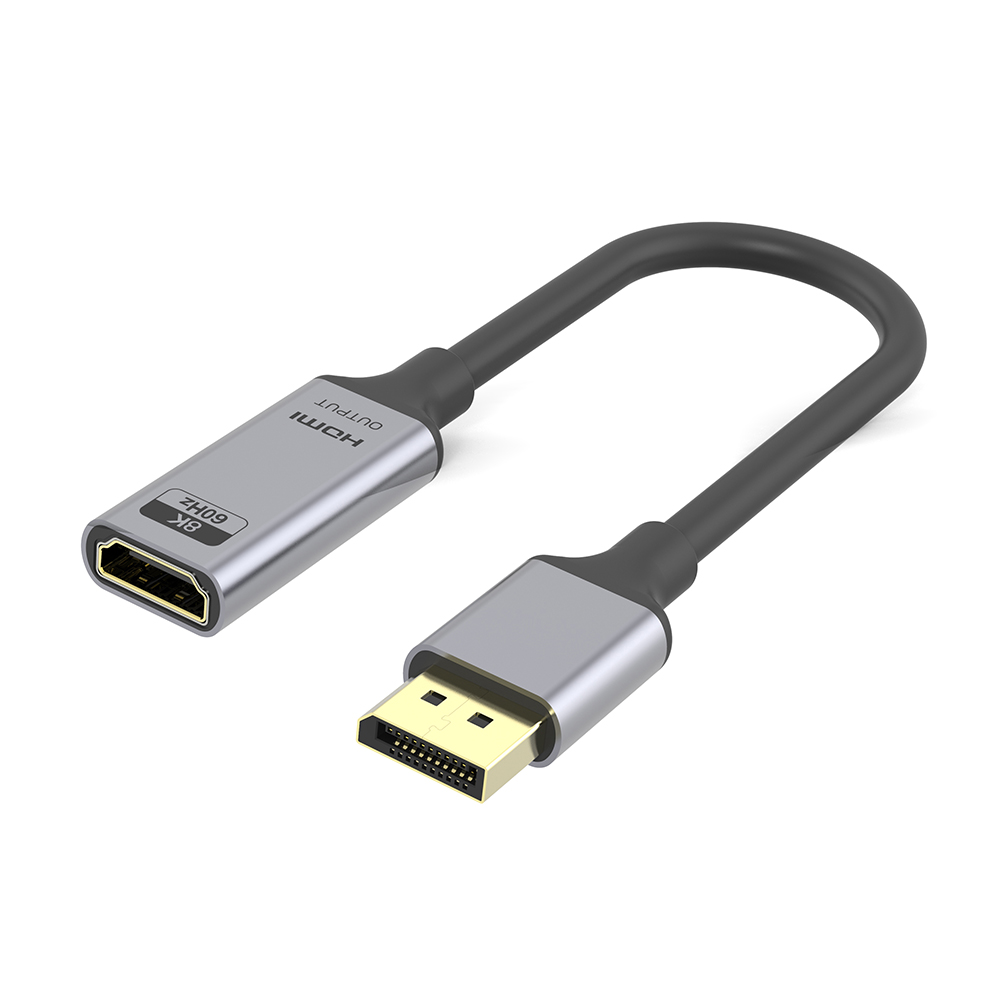
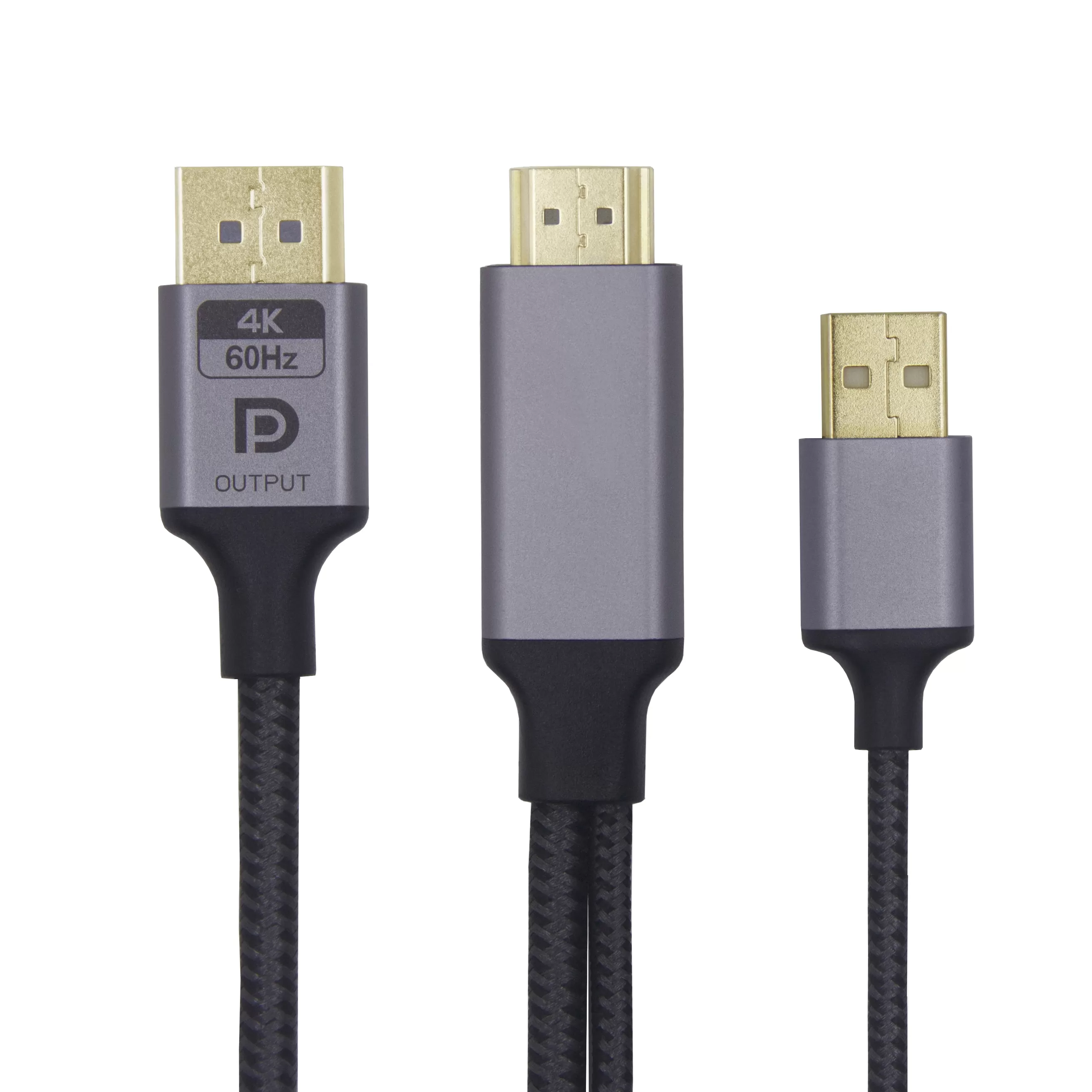
HDMI Male to Displayport Male 4K@60Hz Cable:
4K HDMI2.0 To DP1.2
1.Max 4K@60Hz
2.18Gbps bandwidth
3.aluminum alloy shell
4.PP cotton braided
5.IC:LT6711A
6.Package:PE bag/Customized
Specification
| Bandwidth | 18Gbps |
| Resolution | Max 4K@60Hz |
| Connector | HDMI Male TO DP Male |
| E-mark IC | LT6711A |
| Cable Jacket | Graphene |
| Package | PE/customized packaging |
| Length | 1m/2m/3m/Customized Length |
| Item No. | LS-HDMI2.0DPF |
| Connector Plated: | Gold/Nickel |
| Braid: | Yes/no |
| Alumium Shell color | Gray/ustomized color |
Describe
The HDMI to DisplayPort Cable 4K 60Hz converts video and audio from an HDMI-equipped source to a monitor, projector or commercial display with a DisplayPort input.
Model LS-HDMI2.0DPF uses an LT6711A active conversion IC to convert HDMI 2.0 input into DisplayPort 1.2 output. It supports resolutions up to 4K@60Hz and includes a USB power lead for stable converter operation.
This cable is unidirectional:
HDMI source → DisplayPort display
It cannot be used to connect a DisplayPort source to an HDMI monitor.
| Item | Specification |
|---|---|
| Product type | Active HDMI-to-DisplayPort converter cable |
| Model | LS-HDMI2.0DPF |
| Signal direction | HDMI source to DisplayPort display |
| Input | HDMI 2.0 |
| Output | DisplayPort 1.2 |
| Maximum resolution | Up to 4K@60Hz |
| Published bandwidth | 18Gbps HDMI input |
| Conversion IC | LT6711A |
| External power | USB power lead |
| Length | 1m, 2m, 3m or customized |
| Connector plating | Gold or nickel plated |
| Connector housing | Aluminum alloy |
| Cable finish | Braided or non-braided option |
| Packaging | PE bag or customized packaging |
| OEM/ODM | Available after specification review |
The DisplayPort connector is described inconsistently on the current page as both male and female. Confirm the exact connector gender before placing an order.
The most common purchasing mistake is assuming that HDMI-to-DisplayPort and DisplayPort-to-HDMI cables work in both directions.
They normally use different conversion circuits.
Choose this HDMI to DisplayPort Cable 4K 60Hz when:
The computer, laptop, console or media player has HDMI output
The monitor, projector or display has DisplayPort input
The installation requires active HDMI-to-DP signal conversion
A USB port or USB power adapter is available for converter power
Do not choose this product when:
The computer has DisplayPort output
The monitor has HDMI input
You need a passive DisplayPort-to-HDMI cable
You need USB-C-to-DisplayPort conversion
For the reverse signal direction, view:
DisplayPort to HDMI Cable:
/display-port-cable/
For USB-C video sources, view:
USB-C to DisplayPort:
/adapter-cable/8k-1.4-dp-displayport-usb-type-c-cable-8k-60hz.html
HDMI and DisplayPort use different signal systems. The built-in converter IC requires power to process the HDMI input and generate a DisplayPort output.
The USB power lead should be connected to:
A USB port on the source computer
A powered USB hub
A suitable USB wall power adapter
Another stable USB power source
Some HDMI sources may provide enough power for limited operation, but connecting the USB lead is recommended for more reliable startup, monitor detection and long-term operation.
For equipment-integration projects, buyers should confirm where the USB power lead will be connected and whether its standard length is sufficient.
The HDMI to DisplayPort Cable 4K 60Hz can support up to 4K@60Hz, but the final output depends on the complete system.
The following components must all support the requested mode:
HDMI source output
Source graphics hardware
Source operating-system settings
Active conversion IC
DisplayPort input on the monitor
Monitor resolution and refresh-rate capability
Connecting the cable does not upgrade an HDMI source limited to 4K@30Hz. It also cannot make a DisplayPort monitor display a resolution or refresh rate that the monitor does not support.
For a bulk project, provide the exact source and monitor models so compatibility can be checked through samples.
This product is intended for installations where the available source and display interfaces do not match.
Typical applications include:
HDMI desktop to DisplayPort monitor
HDMI laptop to DP office display
HDMI media player to DP digital-signage screen
HDMI game console to compatible DisplayPort monitor
HDMI industrial computer to DP control display
HDMI test equipment to DisplayPort monitor
HDMI video source to a DP-equipped presentation display
The HDMI to DisplayPort Cable 4K 60Hz is especially useful when replacing the monitor is less practical than adding an active conversion cable.
The active converter can carry digital video and compatible audio from the HDMI source to the DisplayPort display.
Before ordering, confirm:
Whether the monitor has built-in speakers
Whether DisplayPort audio is enabled on the source
Whether separate speakers will be used
Whether HDR is required
Whether HDCP-protected content must be displayed
Whether duplicate or extended desktop mode is required
Duplicate and extended display modes are controlled by the computer or graphics system rather than by the cable itself.
Do not describe this cable as creating two independent displays. It supports one DisplayPort output from one HDMI source.
Broad statements such as “compatible with all laptops and consoles” should be avoided. Active video converters may behave differently with specific graphics outputs, monitors, game consoles, docking stations and operating systems.
Sample testing should include:
Cold startup with both devices powered off
Monitor detection after connection
4K@60Hz output
1080p and lower-resolution fallback
Audio transmission
HDR, if required
Sleep and wake recovery
Hot-plug reconnection
Extended operating stability
Operation with USB power connected
Connector fit and cable strain
For gaming-monitor projects, also state the required 1080p or 1440p refresh rate. A 4K@60Hz specification does not automatically guarantee every high-refresh-rate mode.
The current product is listed in 1m, 2m and 3m versions, with customized lengths available for evaluation.
Choose the shortest practical length that reaches the monitor without placing tension on the HDMI, DisplayPort or USB connectors.
Before requesting a custom length, provide:
Distance between the HDMI source and DP display
Required cable route
Location of the USB power port
Required USB power-lead length
Number of cable bends
Installation inside furniture or equipment
Available connector clearance
Required resolution and refresh rate
Changes to cable length should be tested because the converter, HDMI input section and DisplayPort output section all contribute to final performance.
OEM purchasing should begin with the intended equipment combination rather than appearance options alone.
Provide:
HDMI source model
DisplayPort monitor model
Required resolution and refresh rate
Connector gender at both ends
Main cable length
USB power-lead length
Housing-size restrictions
Installation photographs or drawings
Required audio or HDR functions
Expected order volume
Packaging channel
Len-Link can then evaluate whether the current HDMI to DisplayPort Cable 4K 60Hz is suitable or whether its connector housing, cable length, power lead or packaging must be revised.
Available commercial customization may include:
Aluminum housing finish
Shell color
Laser logo
Cable braid
Product label
Barcode and model number
Individual retail packaging
Bulk packaging
Carton marks
Any change to the converter IC or electronic design requires renewed compatibility and performance testing.
For active converter cables, repeat-order consistency depends on more than connector appearance.
The approved purchasing specification should identify:
Converter IC
PCB revision
Input and output interface
Connector gender
Main cable length
USB power-lead construction
Cable and shielding structure
Housing dimensions
Firmware or configuration, where applicable
Product label
Packaging
Functional-test requirements
Replacing the conversion IC or PCB without approval may change device compatibility, monitor detection or supported display modes.
Len-Link should retain the approved sample and specification as the production reference for future orders.
DisplayPort to HDMI 8K Cable:
/hdmi-cable/dp-to-hdmi-8k-cable.html
Active DisplayPort to HDMI 4K Cable:
/hdmi-cable/active-dp-to-hdmi-cable-abs-shell-cable-4k-60hz.html
USB-C to DisplayPort Cable:
/adapter-cable/8k-1.4-dp-displayport-usb-type-c-cable-8k-60hz.html
DisplayPort Cable Category:
/display-port-cable/
HDMI Cable Category:
/hdmi-cable/
No. It converts an HDMI source to a DisplayPort display only. A separate DisplayPort-to-HDMI converter is required for the reverse direction.
Connecting the USB power lead is recommended because the active conversion IC requires stable power. It can improve startup, monitor detection and operating reliability.
No. The HDMI source must support 4K@60Hz output, and the DisplayPort monitor must support the same resolution and refresh rate.
It can carry compatible digital audio to a DisplayPort monitor. The source settings and receiving display must also support audio.
Support depends on the required resolution, source output, converter IC and monitor. State the exact resolution and refresh rate so the combination can be tested before ordering.
The current design is described as plug and play and does not normally require additional software. The operating system still controls display detection and screen settings.
They can be evaluated according to the required equipment layout. Changes should be tested with the target source and monitor before mass production.
Send your HDMI source model, DisplayPort monitor model, required resolution, refresh rate, cable length, USB power arrangement, connector requirements, packaging and estimated quantity.
Request a sample of the HDMI to DisplayPort Cable 4K 60Hz to verify direction, monitor detection, audio, resolution and operating stability before bulk production.
FAQ
Q: Are you a factory or trading company?
A: We are a source factory, we are in Dongguan, welcome to visit anytime.
Q: How to get product details?
A: Click in the contact we will reply you ASAP. You can contact us by E-mail, Skype, WhatsApp, WeChat. The contact information is in contact us. Tell us the product you want to know, we will send you product details as soon as possible.
A: We support Paypal, T/T(Bank Transfer), Western Union.
A: Our MOQ is 500—3000PCS for different models, while there is no MOQ requirement for "ready to ship" models.
Q: Can I put my logo on the product?
A: Of course you can, we support OEM/ODM
Q: If I can't find the model which I need, How should I do?
A: Please contact us, we have a professional R&D team, I believe we can give you a satisfactory solution.
Booth No. :6S37 in Global Sources Consumer Electronics Show
Mar. 14, 2024
USB-If certificated cable USB4 Cable source factory 40Gbps 240W 48V 5A 8K video cable charging cable
Mar. 14, 2024
USB Certificate HDMI Certificate
Dec. 19, 2023
Offical announce:we have the USB Association Certificate and the HDMI Association Certificate!
Give Us A Call
+86 136 6270 0743
Send Us A Message
Official Location
Shipai Town, Dongguan City, Guangdong, China

As source factory, we have the most strict requirements on quality and service. We can video the production process for clients and provide free samples for quality testing.
Navigation
Products
Media Center